Skip to content
Feature · Analytics and reporting

Revenue, spend and delivery in one view

Convultra is the analytics tool for teams who buy ads. Sessions, sources and pages sit next to conversions, revenue, ad spend and blended ROAS, annotated with the changes that shaped the chart, and shareable as a report a client will actually read.

3 Ad platforms syncing spend: Google, Microsoft, OpenAI
24 mo Analytics history on Scale
Daily Spend sync for blended ROAS
0 Sampling, ever
How it works

What the dashboard is built around

01
Traffic Visitors, sessions, pages, sources, channels, UTMs, geography and devices, with bots and AI crawlers filtered out and reported separately.
02
Revenue Conversion value from your store or backend, attached to the session and the click that earned it.
03
Spend Daily cost from Google Ads, Microsoft Ads and OpenAI Ads, joined to campaigns for ROAS and CPA.
04
Delivery Recovered conversions and delivery health on the same screen, so a dip is explained rather than guessed at.
overviewlast 30 days
revenue          $42,310   +12%
conversions      318       +9%
conv. rate       2.4% of 13,250 visitors
recovered        104 conversions · $13,900
spend            $10,220   blended ROAS 4.1×
ai referrals     61 sessions · $2,240
In the product

What you see once it is running

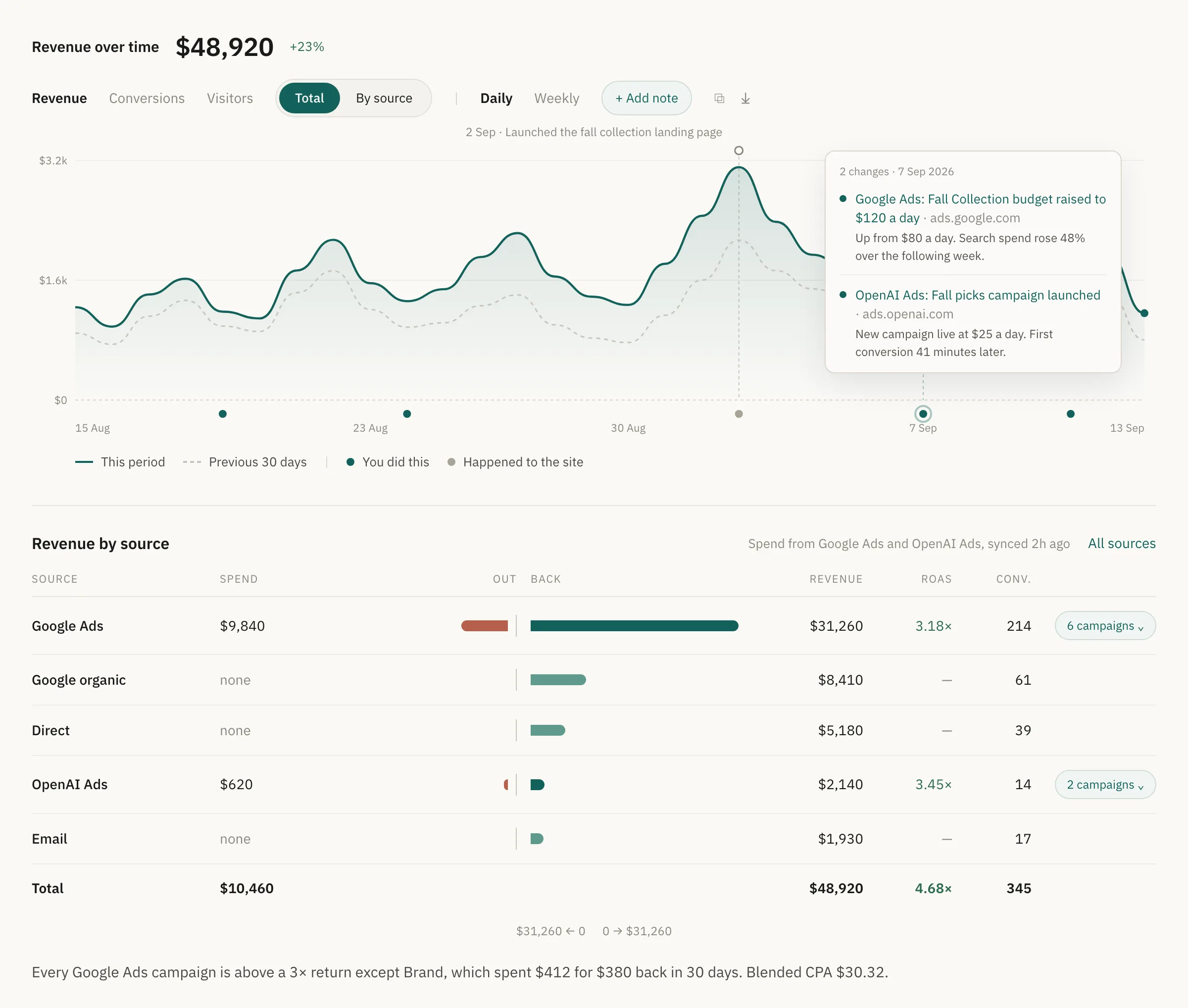
Convultra overview: revenue over the last 30 days with change markers, one open to show the changes made on 7 September, and a revenue by source table with spend, revenue, ROAS and conversions per channel.
Overview · revenue over time and revenue by source
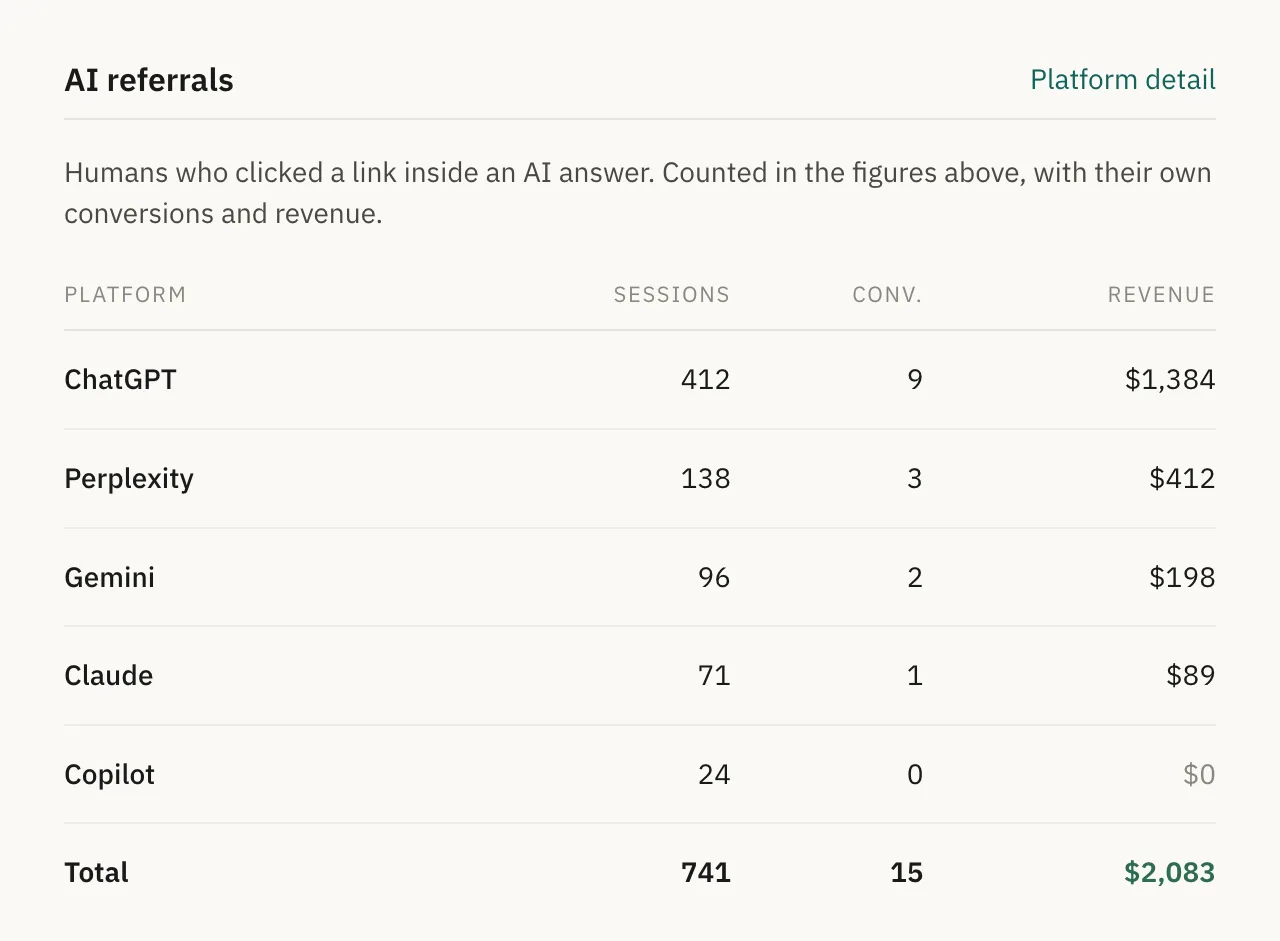
AI referrals table listing sessions, conversions and revenue for ChatGPT, Gemini, Claude and Perplexity.
AI referrals · included on every plan
What you get

Reporting that explains itself

Change markers Google Ads budget edits, paused campaigns and spend spikes plotted on every chart, so a jump has a cause next to it. Add your own for launches and price changes.
Blended ROAS and CPA Spend from connected platforms against revenue from every channel, per source and per campaign.
Shared and scheduled reports A link a client can open without a login, and a scheduled email under your branding. Growth and above.
Organic search Search Console queries, clicks and positions beside paid campaigns, credited with the revenue they drove.
Filtered-out traffic Bots, AI crawlers and excluded IPs named and counted, and kept out of every rate.
Stripe and CRM revenueComing soon Real revenue, refunds and deal values pulled in and matched to the original click.
Specifics

For whoever asks the technical questions

Visitors Unique first-party id, bots removed
Sessions 30-minute inactivity window
Conversion rate Conversions divided by visitors
Blended ROAS Revenue divided by spend across connected platforms
Spend sources Google Ads, Microsoft Ads, OpenAI Ads
History 3, 12 or 24 months by plan
Reports Shared links, scheduled email, white-label on Agency
Access Dashboard, REST API and MCP (beta)

Before you install

Can this replace GA4?

For most paid-media teams, yes. You get traffic, sources, pages, conversions, revenue and spend in one place without sampling. If you need GA4 for other teams, keep it: Convultra runs alongside it.

How is conversion rate calculated?

Conversions divided by unique visitors, with bots and excluded IPs removed first. A tool that divides by sessions will show a lower rate; that is a definition difference, not an error.

Which ad platforms sync spend?

Google Ads, Microsoft Ads and OpenAI Ads sync daily cost per campaign. Meta and TikTok spend are on the roadmap alongside their conversion forwarding.

Can clients see their own reports?

Yes. Shared report links need no login, scheduled emails go out on your schedule, and Agency plans add white-label branding and client logins.

Next

Pairs with

One screen, the whole picture.